Lab: Computer Science Murder Mystery
(Credit to David J. Malan for coming up with the original version of this assignment!)
This week we are going to use low-level programming in C to solve a murder mystery.
Backstory
Philadelphia, PA (DP)—A body of a graduate student was found yesterday in the graduate student offices of the CIS department in Levine hall. Campus police said that graduate students in adjacent offices heard noises coming from the office in question early in day. However, since all graduate students are anti-social and never leave their desks because they're constantly slaving away at research, no one actually witnessed the incident or saw the body. The janitorial staff reported the incident to campus police when they found the body during their nightly rounds.
Police released the identity of the graduate student as one Poor G. Student. They also stated that Student was found dead in his own office although they did not release how he was murdered.
Campus police have arrested four graduate students under suspicion of murder. All four graduate students are inhabitants of the office. However insider sources have claimed that the police have no evidence that these students have comitted the acts as the office was found by campus police to be clean with no sign of the weapons that were used in the attack. Our insider sources also claim that the only piece of evidence found at the scene was a digital camera destroyed in the attack, possibly held by the victim while the attack was taking place. Unfortunately, the memory card of the camera was allegedly damaged in the attack as well.
Update (9:49 AM): We have received mugshots and the identities of the four graduate students that are now being held by the police. All four of them have pleaded innocence in light of the lack of evidence against them.
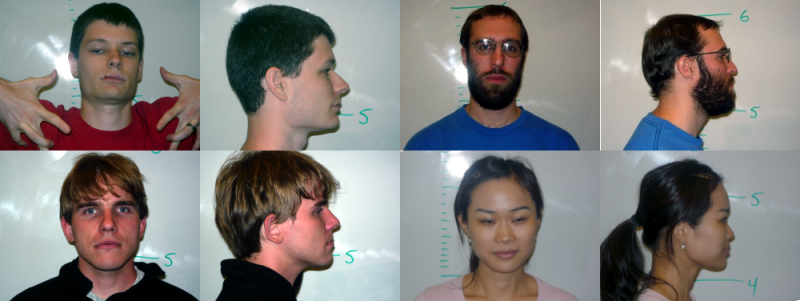
The suspects (left-to-right, top-to-bottom) are Daniel, Brent, Vilhelm, and Aileen.
Part 1: Data Recovery
As computer scientists without direct ties to the CIS graduate students, you have been tasked by the campus police to try to extract data from the damaged flash card found at the scene of the murder. While we can't directly load the data on the card, we can still use our hacking skills to extract the evidence. To do so, we first need to know some things about JPEGs and how they are stored on the flash card.
JPEG headers
It turns out that most JPEGs have a unique signature or header that distinguishes them from other types of files. More specifically, the first four bytes of most JPEGs are either
0xff 0xd8 0xff 0xe0
Or:
0xff 0xd8 0xff 0xe1
where we read the bytes from left to right, first to fourth. If you scan the raw bytes of the flash card and come across these patterns of bytes, it is highly likely that you have found a JPEG.
FAT and storing JPEGs on the flash card
Even though we can find the beginning of a JPEG, this is not necessarily the end of the story. The way that a JPEG (more generally, any file) is stored on the flash card is also important. For example, if the JPEG is stored on many different, non-contiguous memory blocks of the flash card (e.g., due to fragmentation), then a simple, naive scan of the flash card will put these disconnected blocks together. This may manifest itself in a corrupted or unreadable file.
Luckily for us, digital cameras only write to the flash card to save a photo. And also, since the camera was new, our victim probably did not get a chance to delete any files from it. Thus, it is safe to assume that most of the photos are contiguously stored on the card.
Furthermore, many flash card/camera systems use a FAT file system where blocks have a size of 512 bytes. This means that cameras only write to the flash card in blocks of 512 bytes. So, for example, a file that is 520 bytes uses the same number of blocks (namely 2) on the memory card (and thus the same amount of storage) as a file that takes 1024 bytes. This unused space in the first case (504 bytes) is called slack space and can be an indication to forensic investigators that real data is lying nearby. For us, since the camera and flash card are new, the slack space should be all 0s (so it shouldn't hurt if we appended this data to the end of a jpeg file). It also means that the headers of the JPEGs that we are looking for will appear only in the first 4 bytes of each 512 byte block we read from the file!
An approach
With all this in mind, we can come up with a basic strategy for recovery the JPEGs from the damaged flash card.
- We can iterate over the bytes of the flash card and look for JPEG headers.
- Once we find a header, we can open a new file and start filling that file with bytes from the flash card.
- Once we find a new header, we can close the previous file and open a new file for writing, continuing in this manner until we reach the end of the flash card.
Logistics and Instructions
Since I can't give everyone in the class a physical copy of the flash card, I've made an image of the flash card for you to use. The flash card only contains the portion of the flash card that we suspect contains the data in question as the original card was 2 GBs. It can be found here:
Given this file, create a program called recover that takes the name of a card image as an argument and extracts the JPEGs from that card image.
The extracted JPEGs should be named ###.jpg where "###" is a three-digit decimal number starting at 000.
For example, if there are three files in the card image, then the program should write 000.jpg, 001.jpg, and 002.jpgj.
Here is an example of my recover program on a test card image:
$> ls
card.raw  recover  recover.c
$> ./recover
Usage: ./recover <image>
$> ./recover card.raw
Recovering jpegs from card.raw...
Writing to 000.jpg...
Writing to 001.jpg...
Writing to 002.jpg...
$> ls
000.jpg  001.jpg  002.jpg  card.raw  recover  recover.c
$>
You do not need to duplicate the console output from my program, but your program should give an error/usage message similar to mine when the program is not run with exactly one argument (i.e., just ./recover ./recover foo bar).
Part 2: Whodunit?
After you've extracted the photos, take a look at them and figure out the mystery.
Who killed Poor G. Student? Like any good crime, there must means, motive, and opportunity.
In a comment at the bottom of your recover.c source file, answer the following questions:
- Who committed the crime?
- How did they commit the crime (i.e., what weapon did they use)?
- Why did they commit the crime?
- When did they commit the crime? (absolute time not necessary; relative to some event is fine)
You will get full credit for simply attempting to answer these questions. But it's more important to be right to show off your sleuthing skills. Be creative! Remember that graduate students are silly, superficial beings so don't be afraid to let that factor into your conclusion.
Challenge problem: There's More!
In addition to the jpeg, we suspect that there were other files, in particular an email correspondence, left on the flash drive.
Write a program recover_ex that extracts that email correspondence.
You can apply a similar approach as with part 1, but note that email correspondence is pure text.
You will need to come up with a method to know when you've found the block of bytes corresponding to the email.
recover_ex should write the discovered email to mail.txt.
Hints and Advice
- For this lab, you will use the file-processing facilities of
stdio.h. In particular you should keep in mind the functionsfopen,fclose,fread,fwrite, andsprintf. - As mentioned above, you'll need to create a buffer of 512 bytes to store the blocks of data you read from the flash card.
There is no "byte" type in C.
It turns out that
unsigned charserves this purpose sincecharis defined to be a byte.